Leveraging Databricks Lakebase in Generative AI Applications
Datapao
August 4, 2025
With the public preview release of Databricks Lakebase, we explored its practical applications in a real-world generative AI project. This article walks you through how we integrated Lakebase into our agent orchestration platform, focusing on usage patterns, performance gains, and cutting costs.
In this article, we will showcase previous best practices and how you can leverage Databricks Lakebase to make them more efficient by comparing pros and cons from a technical perspective.
Let’s dive into the actual use case in this article.
What is Agentic Generative AI?
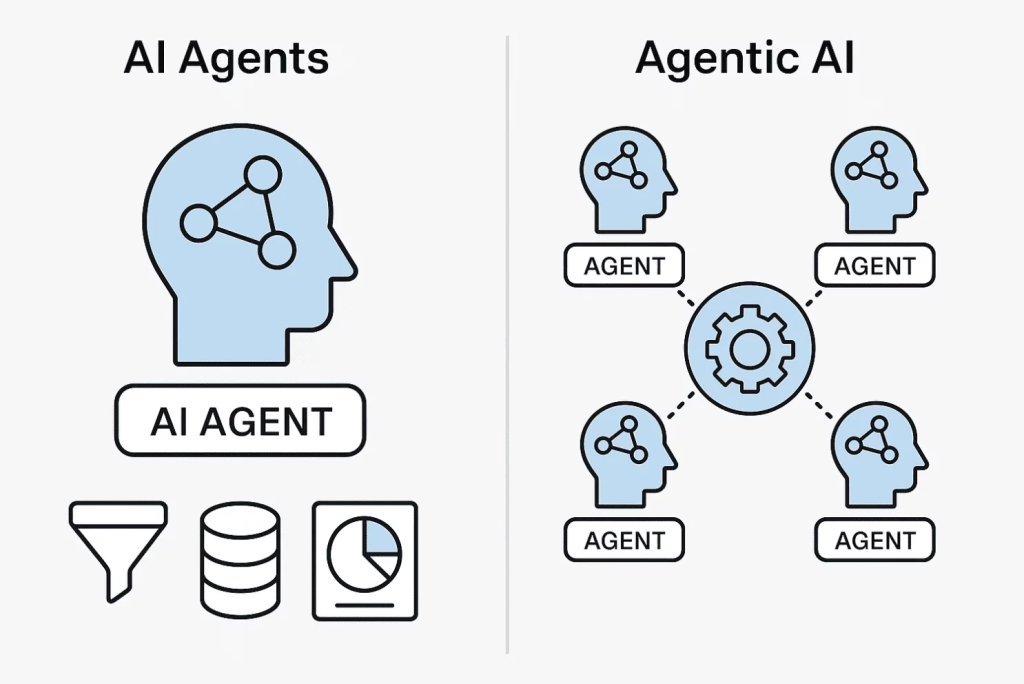
We are creating a complex agentic chatbot application responsible for helping users with business/management-related questions. Agentic Generative AI goes beyond producing content on command – it plans, decides, acts, learns, and operates autonomously toward predefined goals.
Agentic AI solutions usually consist of many independent AI agents who can work together to solve complex tasks. To answer the users’ questions, we created an agentic landscape with more than 50 autonomous AI agents. Each agent has its own purpose, responsibility, and goal. The agents can exchange information, hand off the execution flow to other agents, or invoke each other as a tool.
It’s like asking Siri to not just answer your question – but call your next meeting, send reminders, and sort out your todos – while sipping a latte.
As you might already know, each AI agent requires a configuration to define the system prompt, the exact LLM model and its settings (e.g., temperature, maximum number of output tokens, etc.), what tools or other agents they can invoke, with what instructions they should be invoked as a tool, and so on.
Previously, this relied on a mix of Python config files, notebooks, Unity Catalog delta tables, and object storage. While workable, it lacked flexibility and speed, especially for live configuration changes or fast query access.
Figure 2: Generative AI solution definition with Python config modules, Delta tables in Unity Catalog \ Source: Author
Agent and prompt definitions were stored in version‑controlled Python modules, e.g., agent_config.py:
To tweak behavior - say, changing tool chains or prompt templates - you needed to modify code, commit it, and redeploy the service.
Running ad-hoc SQL queries for debugging or analytics was slow - especially with large history volumes. You had to start a SQL execution engine (e.g., SQL warehouse, or an all-purpose cluster) to query the Delta tables.
Metadata (e.g., file path) was tracked manually or via a secondary Delta table.
Summary of pain points in practice:
Slow configuration updates: Developers needed release cycles even for prompt tweaks.
Inefficient queries: Conversation history queries took seconds – or worse – as tables grew.
Fragmented data stores: Configs in code, history in Delta, metadata in additional files = disconnected system.
Limited operational flexibility: No runtime SQL access for updates, making automation harder.
Figure 3: Generative AI solution definition using Lakebase \ Source: Author
Dynamic Config Updates: Lakebase supports concurrent SQL operations while the app is running, enabling runtime config updates without downtime. Before Lakebase, updating an agent config was like trying to change tires while driving – now you just pull over, tweak the config, and you’re back on the road.
Fast History & Debug Queries: Tables are instantly accessible via SQL. Queries return within milliseconds, dramatically improving start-up time, support, and debugging workflows.
Unity Catalog Permission Enforcement: Lakebase uses Unity Catalog access control natively, so we can restrict configuration and conversation access per role or team without custom ACL logic.
Note: Delta tables remain excellent for large-scale batch analysis or archival workloads – Lakebase excels at operational, interactive use cases.
How to move from files to Lakebase?
If you’re ready to phase out Python scripts and shift configurations into Lakebase’s SQL-driven model, here’s a streamlined, step-by-step migration path:
Provision a Lakebase Database Instance
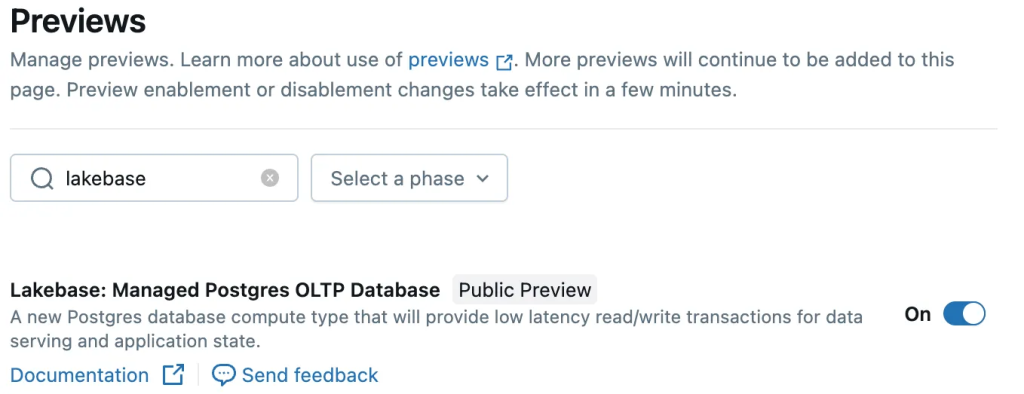
Enable the Lakebase Public Preview in your Databricks workspace via Previews → “Lakebase: Managed PostgreSQL OLTP Database”.
Figure 4: Enable Lakebase in your workspace
Then navigate to Compute → Database instances and create your instance (pick a capacity, optional retention window, etc.)
Figure 5: Create new OLPT database instance
And here comes one of the main advantages of Lakebase over any other OLTP database instance: You can manage the catalog and tables in the Catalog Explorer and leverage Unity Catalog governance capabilities.
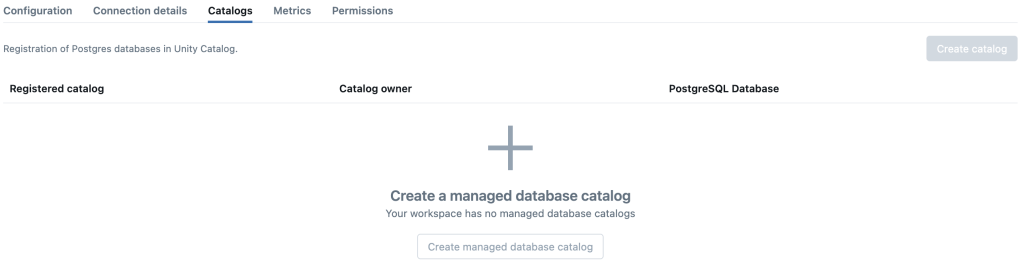
Once the database has tables, go to the Catalogs tab of your Lakebase instance in Databricks. Choose “Register as catalog” (or create a new one), so that the tables appear as a rendered catalog in Unity Catalog.
Note: To do this, you need to have the database instance running.
Figure 6: Register database as Catalog
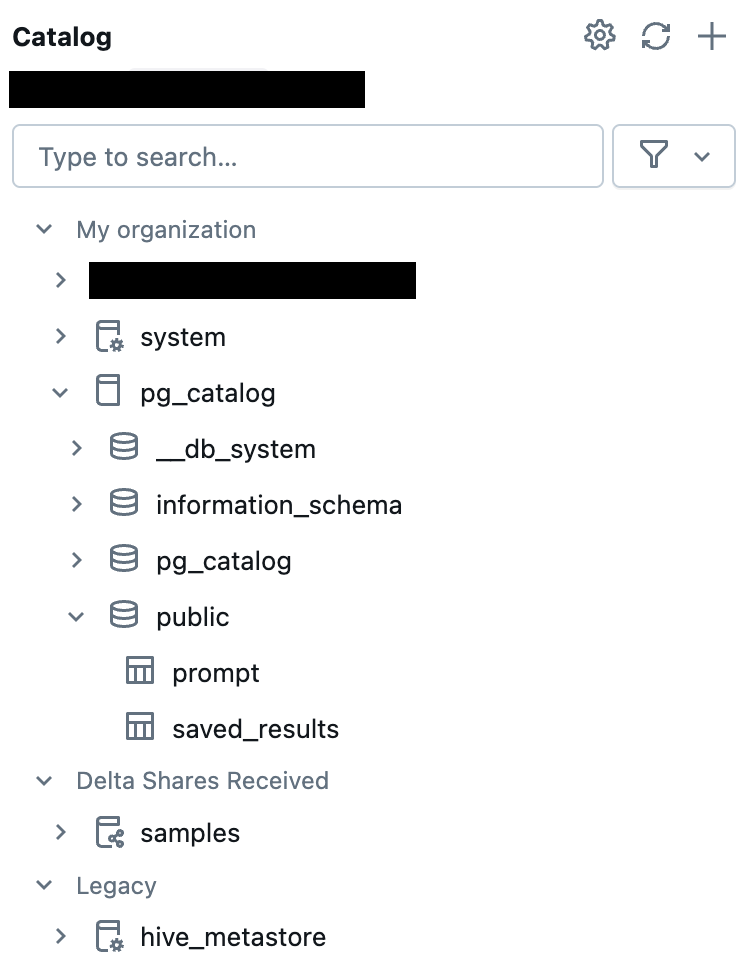
From there, all catalogs, schemas, and tables become governable via fine-grained privileges (down to specific SQL roles, columns, or row-level filters)
Figure 6: Lakebase OLPT database connected to Unity Catalog
There is only one last step left: Create some tables in our shiny new database and populate it. The following code is an example SQL snippet.
CREATE TABLE public.prompt (
	"name" varchar(1000) NOT NULL,
	instruction text NOT NULL,
	model_id varchar(100) NULL,
	id int8 GENERATED ALWAYS AS IDENTITY( INCREMENT BY 1 MINVALUE 1 MAXVALUE 9223372036854775807 START 1 CACHE 1 NO CYCLE) NOT NULL,
	max_tokens int4 DEFAULT 2048 NOT NULL,
	CONSTRAINT prompt_pkey PRIMARY KEY (id)
);
After you have created the table, you should populate it with your agents from the previously used YAML/Python files.
At this point, you have everything set up and configured for your agentic AI application. As a final gift, I provide you with a small Python snippet on how to load the data from Lakebase into your application:
import psycopg2
import dataclasses


@dataclasses.dataclass
class AgentPrompt:
    """Class representing an agent definition."""

    ID: int
    FormattedName: str
    Instruction: str
    RawModelID: str | None = None
    MaxTokens: int = 2048

def get_agents() -> list[AgentPrompt]:
    """Query the database and return the agent definitions.

    Returns:
        List of AgentPrompt instances.
    """
    with psycopg2.connect(
        host=os.environ["PG_HOST"],
        port=os.environ["PG_PORT"],
        dbname=os.environ["PG_DATABASE"],
        user=os.environ["DATABRICKS_CLIENT_ID"],
        # get_access_token function generates a new OAuth2 access token
        password=get_access_token(),
    ) as conn:
        agentprompts = []
        with conn.cursor() as cur:
            cur.execute("""
            SELECT id, name, instruction, model_id, max_tokens
            FROM prompt
            """)
            for row in cur.fetchall():
                p = AgentPrompt(*row)
                agentprompts.append(p)
    return agentprompts
That’s it! I wish you good luck with your Lakebase journey 😊
Let’s wrap up
Lakebase transforms how we manage operational data for generative AI:
Enables real-time, dynamic updates of agent behavior
Delivers instant access to conversations for debugging and auditing
Leverages built-in governance via Unity Catalog
For massive history storage or analytics, however, Delta remains the ideal solution. Lakebase is optimized for active, relational operations where speed and flexibility matter most.
Feature
Previous Approach
Lakebase Approach
Advantage
Agent Config Storage
Python Files
Lakebase Configurations Table
Faster Development
Runtime Updates
Redeploy or Module Reload
Live via SQL
Faster Deployment
Conversation Logs
Delta Tables (slow queries)
Lakebase Conversations Table
Real-Time Access to Stored Data
Query Performance
Moderate
Sub-Second SQL Queries
Faster Start-Up Time
Access Control
Hand‑Rolled
Unity Catalog Enforced
Unified Governance
Operational Complexity
Higher (more external logic)
Lower (simpler data layer)
Ease of Development
Figure 7: Compare previous approach with Lakebase-supported solution
About DATAPAO
DATAPAO is a Data Engineering and Data Science consulting firm that supports the entire data journey, including strategy, implementation, training, and innovation.
As a trusted Databricks partner since 2016, DATAPAO is the one-stop solution to understand and leverage data better building on Databricks. DATAPAO tackles the most challenging data problems and helps organizations become truly data-driven.
Related Posts
5
minute read
AI Agents Redefined: Deep-Research Agentic AI Built on Databricks
From complex data to clear, trustworthy insights — powered by deep agentic AI on Databricks
Databricks Agent Bricks explained: What it does, how it works, and where it’s going next
If you’ve worked in enterprise AI for long enough, you know this story: A team builds a generative AI proof of concept. It looks promising. Everyone’s excited. And then the pilot quietly disappears, not because it failed, but because scaling it responsibly turned out to be too complex, too risky, or too expensive.






.webp)